
Google Sign-In - Guide
Install and configure the Google Sign-In SDK [IDEN-Google-02]
Prerequisites
This guide assumes the following prerequisites have been completed:
Steps | Details |
|---|---|
| • See Beamable's Getting Started for more info |
| • Unity → File → Build Settings |
| • Unity → File → Build Settings |
| • See Google's start-integrating#configure_a_project for more info
|
Configure Unity Project
Follow these steps to get started:
Step | Detail |
|---|---|
| • Go to https://console.cloud.google.com/apis/credentials |
|  • Unity → Window → Beamable → Open Toolbox • Click the "Config" Button |
| 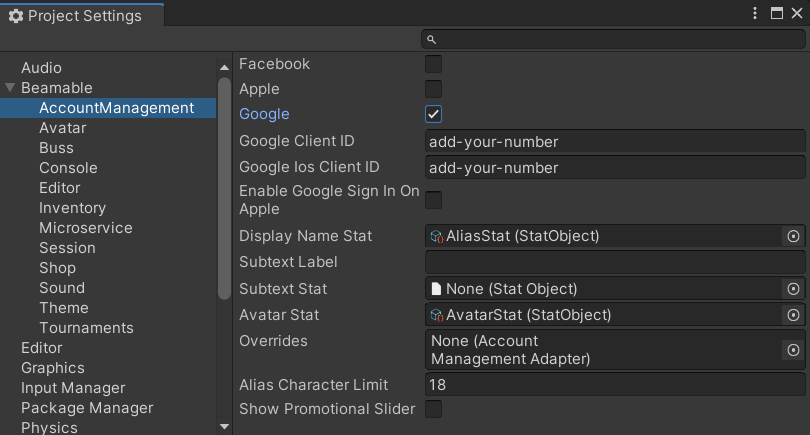 • Set "Google" to true • Set "Google Client Id" to Client Id from Step 1 • (Optional) Set "Google iOS Client Id" to Client Id from Step 1 |
| • Open the .gradle file located in your project at Plugins/Android/mainTemplate.gradle See the code sample below for how the block should look after adding the dependency. |
dependencies {
implementation fileTree(dir: 'libs', include: ['*.jar'])
implementation 'com.google.android.gms:play-services-auth:18.1.0'
**DEPS**
}
Additional iOS Setup
When using Google Sign-In on Apple, the Login Flow depends on version 5 of Google's Sign-In SDK framework for iOS. Enabling sign-in on iOS also requires first-time setup regarding a custom URL scheme specific to your Google Cloud App, including overriding the openURL method on UnityAppController.
Step | Detail |
|---|---|
| • Download Google Sign-In SDK version 5.0.0 or newer from https://developers.google.com/identity/sign-in/ios/sdk |
| • As described in the link from Step 1, your custom URL scheme is a reversed version of your iOS Client ID: |
| • The app delegate for your app should handle |
Method Swizzling for iOS URL Handling

The "Supported URL Schemes" in the Unity Inspector Window
The response from the Google Sign-In flow on Apple uses the custom Supported URL Scheme we set up in the steps above. This requires that the app delegate (namely UnityAppController) implement the openURL method. In order to modify that method, we can use a technique called swizzling, wherein we define a new method with a different selector path and then use method_exchangeImplementations to swap one method for the other.
The code below swizzles the openURL method by adding a category named GoogleSignInAppController onto UnityAppController. When the class has been loaded, the swizzling in the load method will exchange the implementations. Note that in the implementation, we still call the old openURL in case any other handler had been similarly attached.
To use this code as-is, place both GoogleSignInAppController.h and GoogleSignInAppController.mm somewhere within a Plugins/iOS folder in your Unity project.
#import <GoogleSignIn/GIDSignIn.h>
    #import <UnityAppController.h>

    @interface UnityAppController (GoogleSignInAppController)

    - (BOOL)application:(UIApplication *)application
    openURL:(NSURL *)url
    options:(NSDictionary<NSString *, id> *)options;

@end#import "GoogleSignInAppController.h"
#import <objc/runtime.h>
@implementation UnityAppController (GoogleSignInController)
+ (void)load {
method_exchangeImplementations(
class_getInstanceMethod(
self,
@selector(application:openURL:options:)),
class_getInstanceMethod(
self,
@selector(GoogleSignInAppController:openURL:options:))
);
}
- (BOOL)GoogleSignInAppController:(UIApplication *)app
openURL:(NSURL *)url
options:(NSDictionary *)options {
BOOL handled = [self GoogleSignInAppController:application
openURL:url
options:options];
return [[GIDSignIn sharedInstance] handleURL:url] || handled;
}
@endUser Interface
When set up properly, the player's user interface in the game project will be as follows:
Account Management Flow (Default) | Account Management Flow (Google Sign-In) |
|---|---|
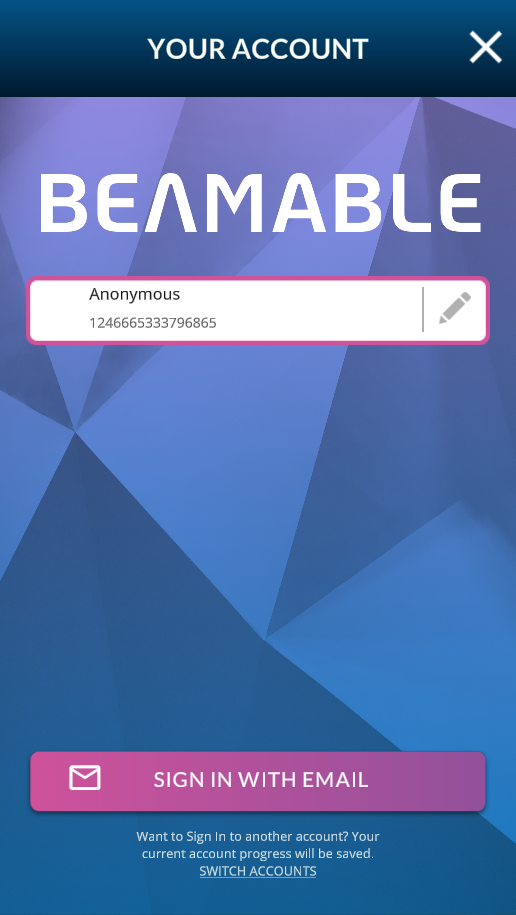 | 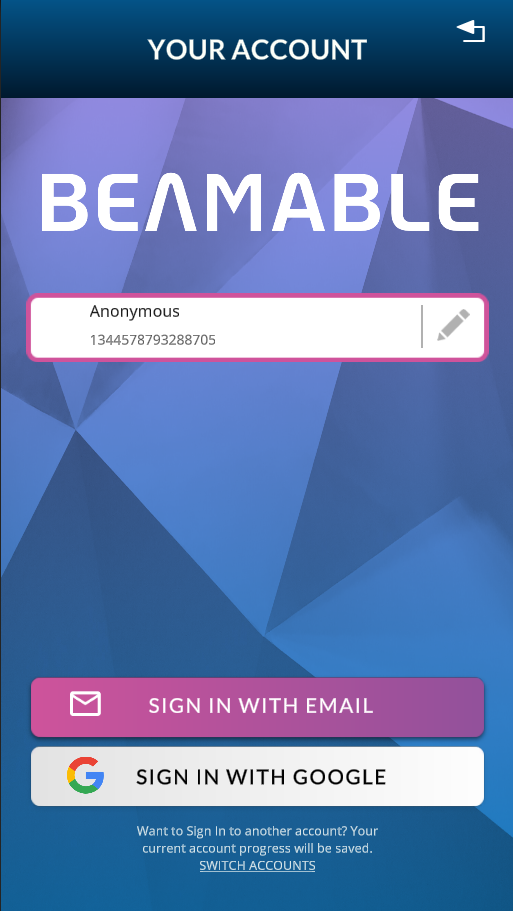 |
Next Steps
From here, the player can edit account details including account name and account avatar.
The player can switch accounts and sign in with various methods. See the Accounts feature page for more info.
When finished, the player can close the Account Management Flow window and return to the game-specific content.
Updated 5 months ago