
Tournaments - Guide
[SOCL-Tournaments-02]
This guide is intended to show you how to create, configure and publish Tournaments.
Steps
Follow these steps to get started:
Step | Detail |
|---|---|
| • Unity → Window → Beamable → Open Content Manager |
| 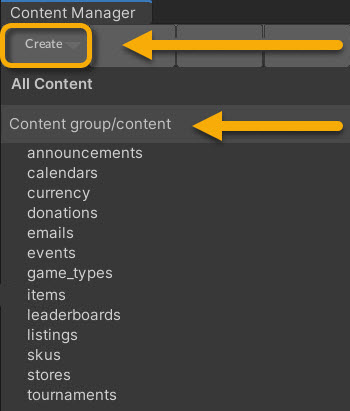 • Select the content type in the list • Press the "Create" button • Populate the content name |
| • Unity → Window → General→ Project |
| • Search by the name given in step #4 |
| 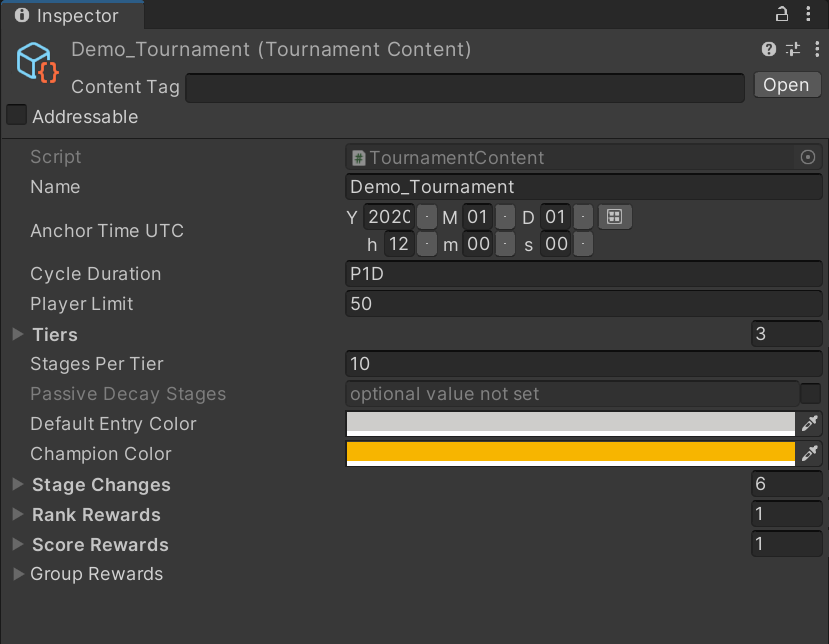 |
| • Unity → File → Save Project Best Practice: If you are working on a team, commit to version control in this step. |
| • Press the "Publish" button in the Content Manager Window |
Next StepsAfter the tournament is published, there are two ways to set up the rest of the tournament flow:
- Tournaments - Prefab: A no-code solution for displaying tournament data with a prebuilt interface.
- Tournaments - Code: A more flexible solution for allowing players to view and participate in tournaments.
Updated 5 months ago