
Unity Toolbox
The drag & drop palette of Beamable features [DVTL-UTW-02]
Overview
This page includes everything needed to use this tool window with the "Beamable SDK for Unity".
Or watch this video.
The purpose of this Tool Window is to offer the game maker a palette of Beamable Feature Prefabs. This is the main entry point for using Beamable.
A common use case for the tool window is covered in the guides.
Related Guides
- See Getting Started for more info
Steps
Follow these steps to get started:
Step | Detail |
|---|---|
| • Unity → Window → Beamable → Open Toolbox |
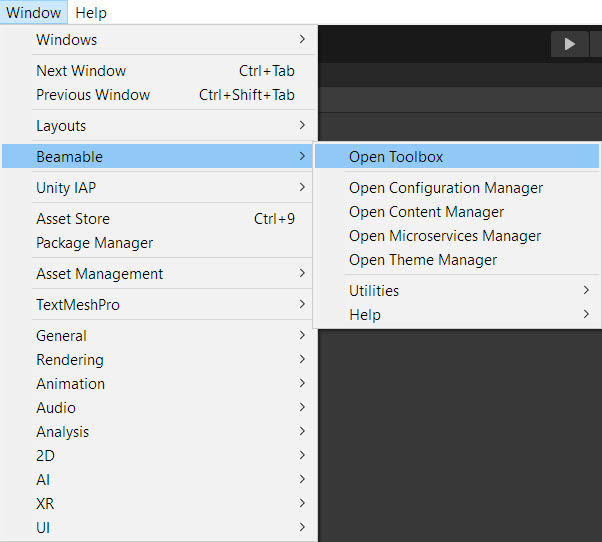
The “Beamable” Menu
User Interface
Here is the user interface of the Beamable tool window.
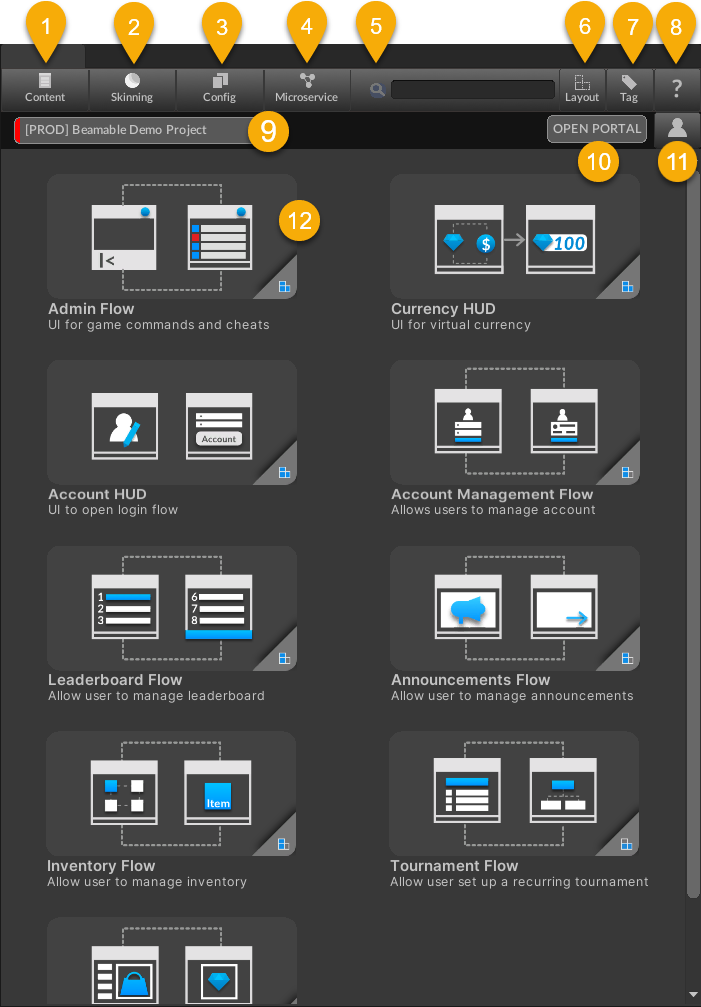
The Beamable Toolbox Window
Name | Detail |
|---|---|
| See Content Manager for more info |
| See Theme Manager for more info |
| See Configuration Manager for more info |
| See Microservices Manager for more info |
| Ex. "Admin Flow", "Announcements Flow" |
| Ex. "Portrait", "Layout" |
| Ex. "Admin", "Announcements" |
| See Toobox for more info |
| See Realm for more info |
| See Portal for more info |
| See Login for more info |
| See Feature for more info |
Updated 5 months ago